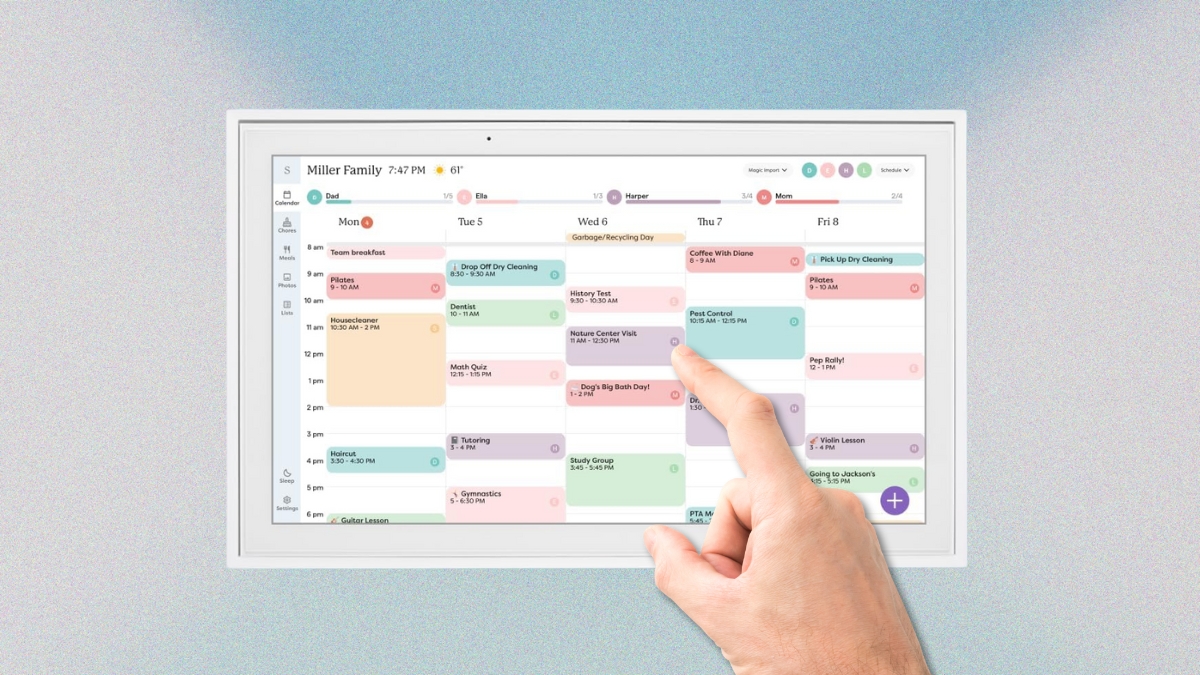
Keeping up with school events, doctor visits, meal plans, and chores? It can feel like a full-time job. The Skylight digital calendar makes family planning easier with a bright touchscreen and simple features that actually help. It combines schedules, lists, and tasks into one easy-to-read display that’s always up to date.
You can mount it in the kitchen, hallway, or anywhere your family gathers. With clear visuals and real-time updates, it replaces whiteboards, sticky notes, and missed messages. Here’s how it turns family chaos into a calm, organized flow.
The Skylight Digital Calendar Keeps Your Family in Sync
This smart calendar display connects with all your existing tools—Google Calendar, Outlook, iCloud, Cozi, and more. Each family member gets a color-coded line for their plans, so you know who’s doing what at a glance.
There are two sizes. The 15-inch model works well in smaller spots, while the 27-inch Max version gives you a bigger view for busier households. Both use a responsive touchscreen, and setup takes just minutes with Wi-Fi.
It’s more than a digital wall calendar. It’s a command center for your home.
A Digital Wall Calendar Built for Busy Families
The standard 15-inch version has a 1080p screen and compact frame. It’s 15.8 inches wide and fits neatly into kitchens, offices, or entryways. It weighs around 8 pounds and includes a simple wall mount.
If you want something larger, the 27-inch Skylight Max is your pick. It offers QHD resolution with sharper detail and a big, bold layout you can read from across the room. It’s heavier at 22.7 pounds, so you’ll need solid wall support. This version also includes some bonus features like an AI sidekick.
Both look clean, modern, and fit with any room style.
Smart Features Make Life Easier
You can assign tasks and track chores directly from the screen. Drag and drop names onto tasks. Set reminders. Mark things complete. Everyone can see what’s done and what’s left—no more repeating yourself 10 times.
It’s also great for meal planning. Add recipes, track ingredients, and plan dinners by day. With the Max model, the built-in assistant can even suggest meals and build your grocery list.
Create shared to-do lists, shopping lists, and event plans. It all syncs across devices, so you’re never out of the loop while you’re out running errands.
A Touchscreen Wall Planner With More Than a Calendar
The interface also shows the weather, upcoming events, and reminders. With the optional Skylight Plus plan, you unlock extras like turning the screen into a photo frame when it’s not in use.
The “Magic Import” tool pulls info from emails or PDFs—like school calendars or team practice schedules—and adds it directly to the display.
And if you want your family to actually use the calendar? This one makes it easy and fun.
Price and Subscription Details
Here’s the cost breakdown:
- 15-inch model – $314.00
- 27-inch Skylight Max – $569.99
- Skylight Plus subscription – $39/year (optional but adds more features)
Each purchase includes a free 30-day trial of Skylight Plus. After that, the device still works as a calendar without the extras, so you’re not locked in.
Both sizes are available on Amazon and the Skylight website. Watch for deals during big sales like Black Friday or back-to-school season.
What Real Users Say About This Interactive Family Calendar
Families love how easy it is to install and use. Parents say it cut down on confusion and made mornings smoother. Kids and teens actually check the calendar—because it’s fun to tap and use.
The clear layout and real-time syncing help families avoid missed events or duplicated plans. It’s a big upgrade from paper charts or scattered phone apps.
Some users mention that you need the subscription to get the full benefit. And others hoped for more app integration or entertainment features, but that’s not what this planner is built for.
Talk About the Bigger Picture
The Skylight digital calendar is more than just a fancy screen on the wall. It keeps everyone on the same page without needing constant reminders. You can see your whole week, track meals, and keep tasks moving—all in one place.
If you’ve been juggling paper notes, group texts, or mental lists, this calendar can take a lot off your plate. You’ll find it on Amazon, and setup only takes a few minutes.
Let’s just say—it’s one of those tools you didn’t know you needed until your whole week runs smoother.
Leave a Reply