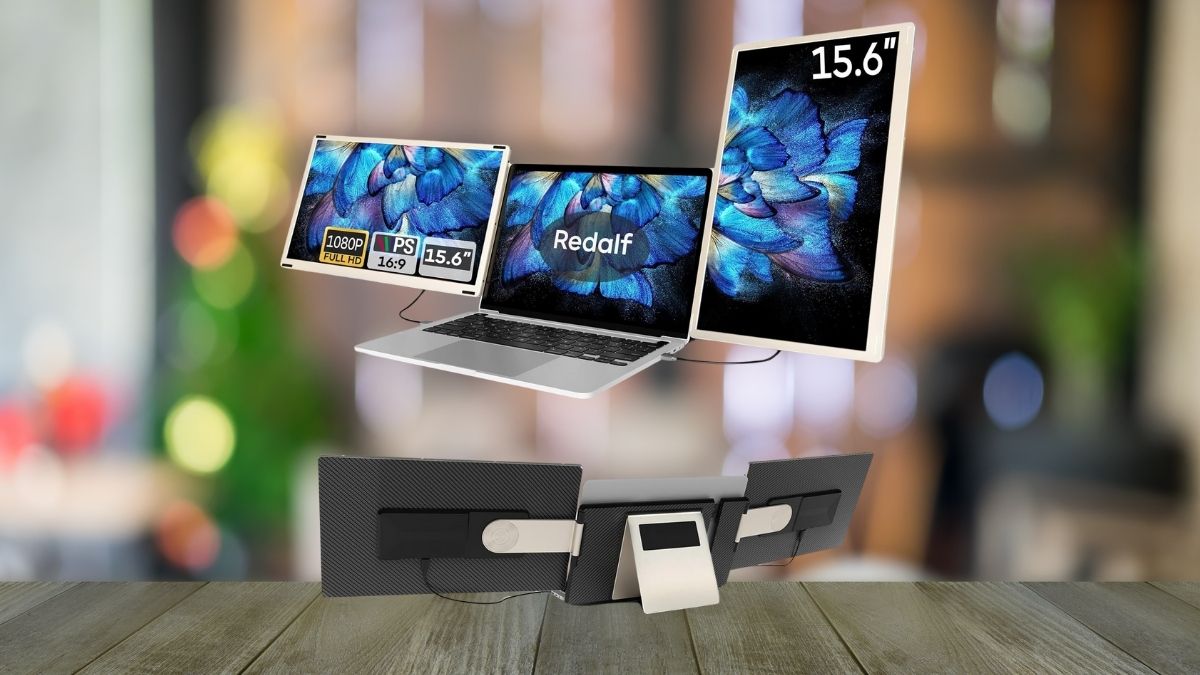
Modern work demands more than a single screen can offer. Whether you’re a software developer, financial analyst, content creator, or remote worker, multitasking on a laptop can quickly feel like a bottleneck.
That’s where the Redalf 15.6″ Triple Laptop Screen Extender changes the game. Designed to triple your display space on laptops ranging from 13″ to 17.3″, this system offers a true desktop experience without sacrificing portability.
This guide explains how the Redalf extender works, how it enhances productivity, and how you can integrate it into your workflow—whether you’re in an office, a café, or on the move.
How It Expands Your Laptop Workspace
Adding two additional 15.6″ screens to your laptop may sound like a heavy lift, but the Redalf extender is engineered for simplicity and flexibility.
Physical Attachment and Setup
- Clamp-on mounting: It attaches directly to the back of your laptop screen and locks into place, expanding outward like a book.
- Rotating hinges: The side screens rotate up to 235° horizontally and 90° vertically, enabling customized setups including landscape, portrait, and stacked configurations.
Compatibility and Connection
- Works with 13″–17.3″ laptops: Adjustable design fits a wide range of screen sizes.
- Connection ports: USB-C, USB-A, and HDMI options accommodate most modern and older laptops.
- No drivers needed: Plug-and-play functionality streamlines installation.
How It Boosts Visual and Multitasking Efficiency
The Redalf extender goes beyond just extra space—it delivers high performance visuals designed for serious work.
Display Specs
- Full HD IPS panels: All three screens offer 1920×1080 resolution with excellent color accuracy and clarity.
- 300 nits brightness & 1000:1 contrast: Clear even in bright rooms or daylight.
- 2ms response time & 60Hz refresh: Ideal for smooth visuals in both work and light gaming.
Comfort and Collaboration
- 90° wide viewing angles: Share screens easily with clients or team members.
- Anti-glare and low blue light: Reduces eye strain during long work sessions.
- Built-in speakers: Handy for media playback and virtual meetings.
How It Adapts to Any Workstyle
Whether you’re a digital nomad or a desk-bound pro, the Redalf is built to be versatile.
Flexible Use Modes
- Portrait mode: Excellent for reviewing code, long documents, or social feeds.
- Single screen use: Detach one panel when space or weight is a concern.
- Stacked configuration: Stack screens vertically to maximize space in cramped setups.
Portability and Travel Readiness
- Foldable design: Compresses into a 13.9″ x 8.15″ x 3″ form factor.
- Weight: At 9 lbs, it’s heavier than typical portable monitors but manageable for frequent travelers.
- Carrying case included: Keeps screens and cables organized and protected.
How It Integrates Across Devices and Operating Systems
You don’t need to worry about tech compatibility with this extender.
Supported Platforms
- Windows & Mac: Full functionality on most machines, including M1 Pro/Max and M2/M3 Pro/Max MacBooks.
- Adapters for base M1/M2/M3 Macs: Required due to Apple’s limitations.
- Chrome OS, Android, Linux, Samsung DeX: Broad support for niche users and hybrid work environments.
Power and Cable Management
- USB-C for power and video: One-cable solution for modern laptops.
- USB-A & HDMI fallback: Use an extra USB cable for older laptops without USB-C.
- Low battery drain: Efficient when connected to external power; screens can be toggled off when mobile.
How It Delivers Real-World Results
Specs aside, the Redalf proves its worth through performance and user experience.
Productivity in Action
- Software developers: View code, documentation, and app output simultaneously.
- Finance pros: Monitor live data, spreadsheets, and communication tools without tabbing.
- Video editors: Keep timelines, previews, and assets visible at once.
Deployment and Durability
- Setup in under 60 seconds: From bag to full setup in less than a minute.
- Durable build: Withstands frequent packing and unpacking without compromise.
- Consistent performance: No lag or glitches even with heavy apps spread across screens.
How It Justifies Its Price
At $279.99 (discounted from $379.95) and available on Amazon, the Redalf isn’t a budget gadget—but it’s a clear value proposition for professionals.
- Fast ROI: The time saved through reduced context switching can pay for the extender in weeks.
- Lifetime utility: Compatible with current and future devices across multiple operating systems.
- Professional-grade investment: Ideal for consultants, freelancers, remote teams, and digital creatives.
Why the Redalf Extender Is a Smart Upgrade, Not Just an Accessory
The Redalf 15.6″ Triple Laptop Screen Extender transforms any compatible laptop into a full-fledged workstation.
With impressive display quality, thoughtful ergonomics, broad compatibility, and intuitive setup, it empowers serious professionals to work smarter, not harder. If you rely on multitasking and mobile productivity, the Redalf is more than a nice-to-have—it’s a strategic upgrade.
Leave a Reply