The average household now connects over 25 devices at once, from smartphones to smart TVs. This surge in simultaneous connections pushes older routers to their limits.
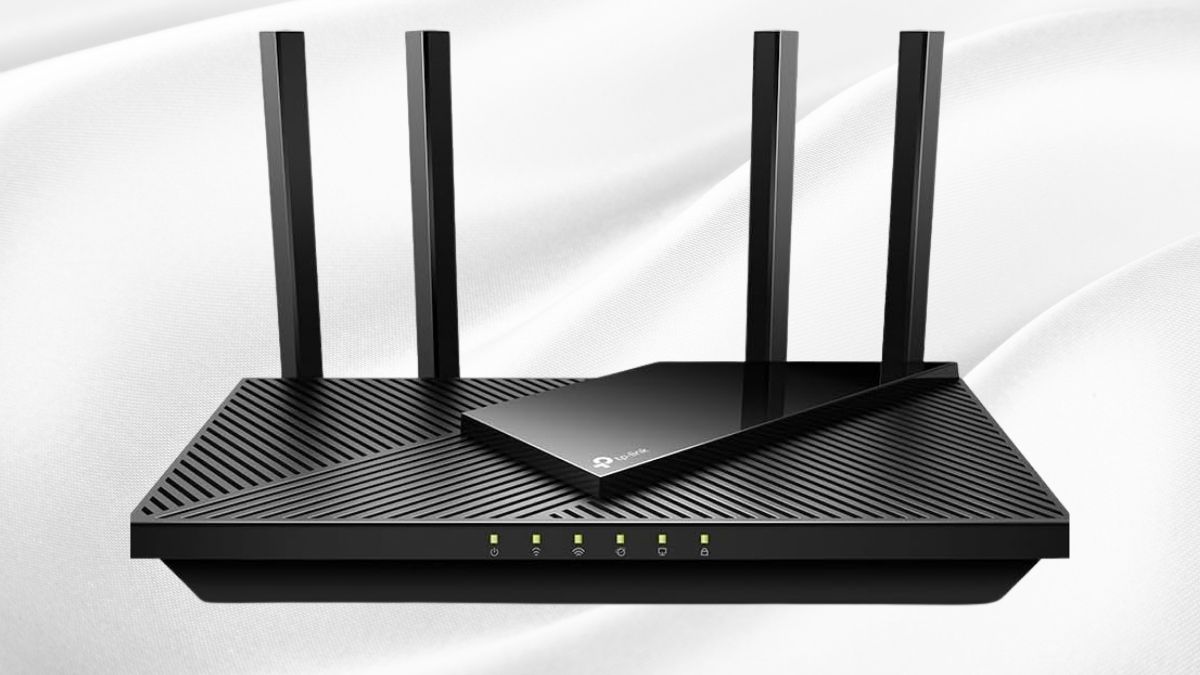
The TP-Link AX1800 WiFi 6 Router V4 (Archer AX21) aims to handle this load with next-generation wireless capabilities, making it a strong contender in the mid-range market.
With theoretical speeds up to 1.8 Gbps and advanced features like OFDMA, MU-MIMO, and beamforming, the AX21 promises a balance of performance and affordability. But how does it hold up in real-world use?
Cutting-Edge WiFi 6 Technology Explained
Before diving into the numbers, it’s important to understand what WiFi 6 brings to the table and how the AX21 uses it to improve daily performance.
The Evolution to 802.11ax
- Implements the 802.11ax (WiFi 6) standard with up to 1.8 Gbps throughput.
- Splits into 1.2 Gbps on the 5 GHz band and 574 Mbps on the 2.4 GHz band.
- Outperforms WiFi 5, especially in busy multi-device environments.
OFDMA: Handling Multiple Devices at Once
- Divides each channel into smaller resource units for simultaneous device communication.
- Cuts latency and keeps speeds steady with multiple active connections.
MU-MIMO: Smooth Streaming and Gaming
- Sends dedicated streams to multiple devices at the same time.
- Supports stable 4K streaming on one device while gaming online on another.
Beamforming: Stronger, Targeted Signals
- Directs wireless signals toward connected devices instead of broadcasting evenly.
- Improves range, stability, and wall penetration within the 1,200 sq ft coverage area.
Real-World Performance Metrics
Numbers tell part of the story, but real-world testing shows how the AX21 compares to older WiFi 5 routers.
- At 15 feet line of sight: 30–40% faster throughput than AC routers.
- With 10+ connected devices: Maintains 85% of max speed (vs. 50–60% on WiFi 5).
Design and Hardware Specifications
The AX21’s design and build aim for functional efficiency rather than flashy extras.
Physical Characteristics
- Measures 10.2 × 5.3 × 1.5 inches, excluding four adjustable antennas.
- Black plastic casing with ventilation grilles and front LED indicators.
Port Configuration
- 1× Gigabit WAN and 4× Gigabit LAN ports.
- No USB port (present in the older AX20).
Internal Hardware
- Triple-core processor for network and encryption tasks.
- Optimized RAM for stable multi-device handling.
Power Efficiency & Thermal Management
- Draws ~9W in use and ~5.5W idle (15% more efficient than WiFi 5 models).
- Stays cool under continuous heavy load with well-placed ventilation.
Setup Process and User Interface
The AX21 keeps installation simple while offering advanced customization for power users.
Initial Configuration
- Quick setup via web interface (tplinkwifi.net) or TP-Link Tether app.
- Takes under 10 minutes to get online.
TP-Link Tether App
- Monitors devices, manages bandwidth, sets up guest networks, and enables parental controls.
- Allows remote access to network settings.
Web Interface Capabilities
- Offers advanced controls: VLAN setup, VPN server, port forwarding, and DHCP customization.
Advanced Customization & Firmware
- Adjust transmission power, channel selection, and SSID settings.
- Supports auto/manual firmware updates for security and performance.
Performance and Coverage Analysis
Testing across distances and conditions shows where the AX21 shines and where it has limits.
- 5 GHz close range: 840–920 Mbps
- 5 GHz at 30 ft through wall: 650–720 Mbps
- 2.4 GHz close range: 220–280 Mbps
- 2.4 GHz extended range: 150–200 Mbps
Coverage is solid for small to medium homes up to 1,200 sq ft. Multi-level performance depends on construction, with a 30–40% speed drop between floors.
Security Features and HomeShield
The AX21 balances strong security with an easy-to-use interface.
- WPA3 encryption for modern devices, with WPA2 fallback.
- HomeShield free tier includes network scanning, device prioritization, and basic parental controls.
- VPN server (OpenVPN and PPTP) retains 85–90% internet speed.
- QoS settings allow prioritizing gaming, video calls, or specific devices.
OneMesh Compatibility and Expandability
For those needing extra coverage, the AX21 integrates with TP-Link’s OneMesh ecosystem.
- Works with extenders like RE505X, RE605X, and RE300.
- Single network name across router and extender for seamless roaming.
- Adding one extender covers homes up to 2,500 sq ft at about half the cost of a mesh system.
Value Proposition and Alternatives
At $80–$100, the AX21 sits in the sweet spot for budget-friendly WiFi 6 performance.
- Outperforms most sub-$100 routers.
- Includes VPN server—a rare feature at this price.
- Cheaper models like AX10 or AX1500 lag behind in speed and multi-device handling.
Who Should Buy the AX21
The AX21 is best suited for:
- Small to medium homes with up to 15 connected devices.
- Internet plans up to 500 Mbps.
- Users upgrading from WiFi 5 who want future-ready performance without overspending.
Final Take
The TP-Link AX1800 WiFi 6 Router V4 (Archer AX21) offers excellent value in 2025, delivering strong performance, stable coverage, and useful extras like VPN hosting and OneMesh expansion. While it lacks DFS channels and a USB port, its reliability, security features, and easy setup make it a top pick in the budget WiFi 6 category.
Available on Amazon as part of the Amazon New Best Sellers in Computer Routers, the AX21 is worth considering if you want faster speeds, better multi-device handling, and solid coverage without spending on high-end mesh systems. You can explore more products in this category to find the best fit for your home network needs.
Leave a Reply