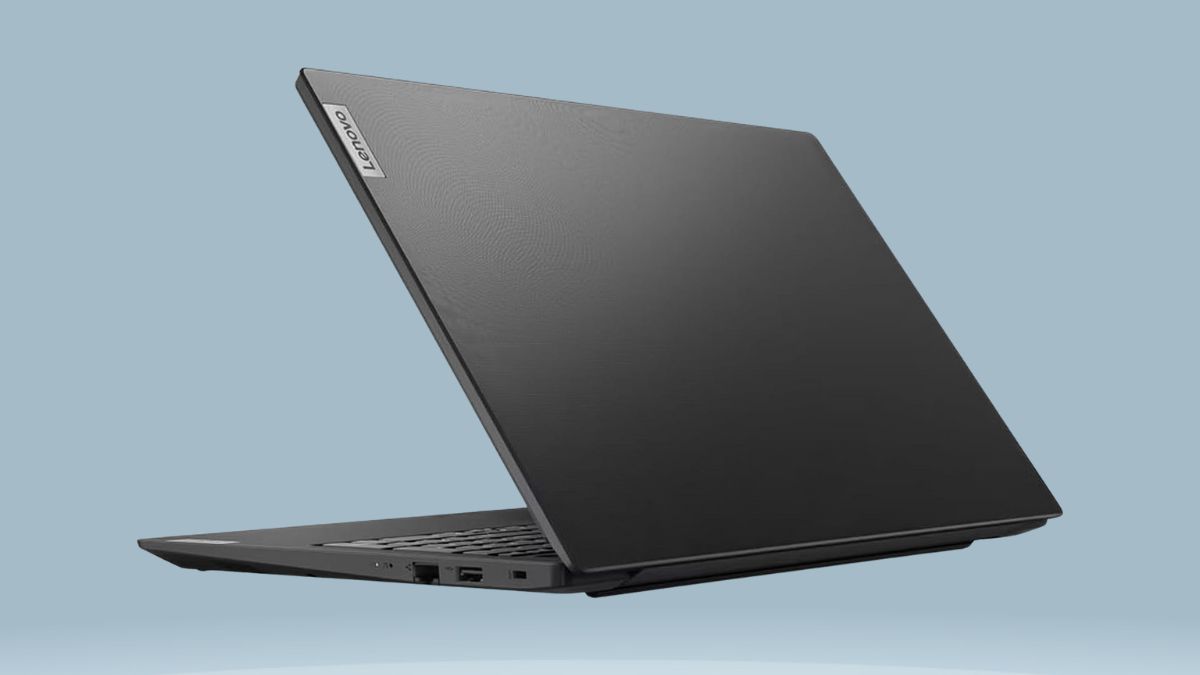
In a market flooded with mid-range laptops chasing performance hype, the Lenovo V15 G2 takes a different route.
It zeroes in on what actually matters for students, remote workers, and budget-conscious professionals: memory, storage, and reliability. This 15.6″ FHD notebook may run on a modest Intel Celeron N4500, but its rare pairing of 32GB RAM and a 1TB SSD makes it an unusually capable multitasker in its class.
Here’s how it manages to offer such strong everyday utility at such a wallet-friendly price point—and where it may fall short depending on your needs.
Design That Keeps Things Practical
At first glance, the V15 G2 doesn’t scream innovation, but its practical construction tells another story.
- Portability Meets Utility: Weighing 1.7kg and just under 20mm thick, this machine hits the sweet spot between screen real estate and portability.
- Functional Build: Its matte black chassis and full-sized keyboard (including a numeric keypad) make it ready for office or classroom use. The hinges feel sturdy enough for daily commutes.
- Privacy Matters: A physical webcam shutter adds peace of mind, especially for remote workers and students.
There’s no keyboard backlighting in most models, so night owls may want to factor that in.
A Display That Works Where You Do
Lenovo fits the V15 G2 with a 15.6-inch Full HD TN panel. It’s not a color-accurate display by any means, but it holds up well for productivity tasks.
- Anti-Glare Finish: Reduces reflections and eye strain, especially in office lighting.
- Brightness Levels: Fine for indoor use, though visibility outdoors or in bright sunlight is limited.
- Color Accuracy: At ~45% NTSC, it’s not suited for media creators—but adequate for document work and video playback.
Audio gets a reliable boost from Dolby-tuned stereo speakers, good enough for calls and streaming, though not meant for immersive listening.
Where Performance Surprises: RAM and Storage
Despite the entry-level processor, this laptop’s real power lies in its memory and disk setup.
- Processor: The Intel Celeron N4500 is a basic dual-core chip—fine for browsing, typing, and light multitasking.
- Memory: The standout feature. 32GB of DDR4 RAM is a unicorn in this price class. It allows users to open dozens of browser tabs, run multiple apps, and keep performance smooth.
- Storage: The 1TB PCIe NVMe SSD brings fast boot times, near-instant app launches, and plenty of space for media, files, or project folders.
While the CPU can’t handle heavy-duty software like video editors or 3D apps, this RAM + SSD combo makes everyday tasks noticeably snappier than similarly priced machines.
Ports, Connectivity, and Compatibility
Lenovo includes a robust port selection, which isn’t always guaranteed at this price.
- USB Ports: One USB-C 3.2 Gen 1, one USB-A 3.2 Gen 1, and one USB-A 2.0.
- Video & Network: HDMI 1.4b and a full-size RJ-45 Ethernet jack support wired setups.
- Audio & Charging: A 3.5mm combo jack and dedicated power input round out the package.
It also supports Wi-Fi 6 and Bluetooth 5.2, offering smooth wireless performance and strong future compatibility for newer peripherals.
Battery and Daily Use
Battery life is respectable but not record-breaking.
- Battery Specs: The 38Wh 2-cell battery averages 5–6 hours of mixed use—enough for school days or meetings, but not long-haul flights.
- Charging: Fast-charging features and Windows 11’s battery optimizations help stretch usage when you’re on the go.
Given the efficient Celeron chip and TN panel, the system is relatively power-thrifty—but carrying the compact charger is still a good idea for longer days.
Best Use Cases in the Real World
Here’s how different types of users can make the most of what the V15 G2 offers:
- Students: Ideal for multitasking between virtual classes, word processing, and research tools without freezing or lag.
- Office Professionals: Handles email, spreadsheets, video conferencing, and browser-based apps smoothly—plus you get Windows 11 Pro features like BitLocker and Remote Desktop.
- Remote Workers: Good webcam placement, solid sound, and a reliable keyboard layout make it a strong candidate for home offices.
- General Users: Perfect for anyone who needs large storage, lots of memory, and basic computing without the clutter of high-end performance features they’ll never use.
This is not a machine for gamers, video editors, or power users—but it’s perfectly tuned for productivity-focused multitaskers.
Is It Worth Buying?
Absolutely, for the right buyer.
- High Points:
- Unmatched RAM and SSD combo in the budget segment.
- Professional design with useful business features.
- Windows 11 Pro adds extra value.
- Unmatched RAM and SSD combo in the budget segment.
- Caveats:
- Celeron CPU limits heavy or specialized software use.
- TN display isn’t ideal for creatives.
- Battery life is average, not exceptional.
- Celeron CPU limits heavy or specialized software use.
Available on Amazon, this configuration makes a compelling alternative to similarly priced devices that may offer faster processors but far less RAM or storage.
A Thoughtful Budget Choice
The Lenovo V15 G2 proves you don’t need top-tier specs across the board to create a responsive, productivity-oriented laptop. By focusing on memory and storage, Lenovo has built a budget machine that actually feels fast in daily use—even if the processor is modest.
If you’re a multitasker on a budget and know you don’t need GPU horsepower, this is a smart, value-rich option in 2025’s crowded laptop market.
Leave a Reply