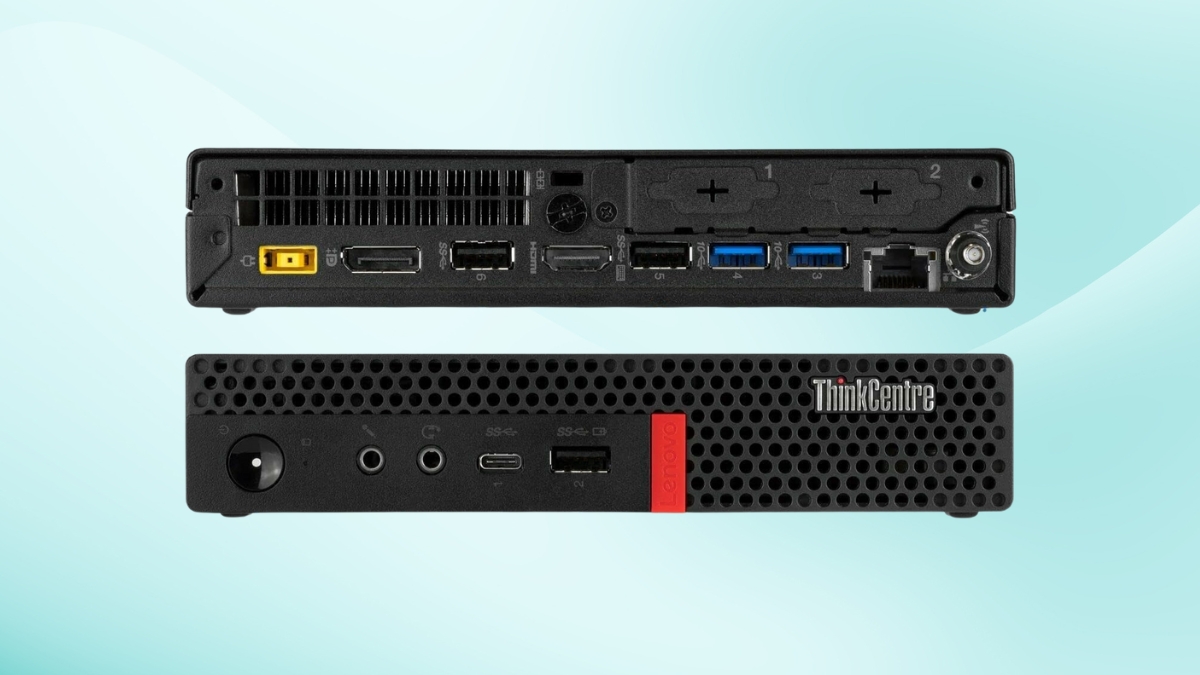
Looking for a small desktop that doesn’t compromise on performance? The Lenovo ThinkCentre M920q Tiny Desktop is a compact machine packed with the power of a full-sized workstation. Weighing just 2.91 pounds, this mini PC is designed for efficiency without taking up much space.
This tiny yet powerful computer is built for business, offering strong security features, excellent connectivity, and upgradeable memory. If you need a space-saving solution that can handle demanding tasks, this might be the perfect fit. Let’s explore what makes this model a great choice.
Lenovo ThinkCentre M920q Tiny Desktop: Compact Design and Performance
The Lenovo ThinkCentre M920q Tiny Desktop has a sleek and durable design with dimensions of 179 x 183 x 34.5 mm. At only 1.32 kg, it fits easily in tight spaces and can be mounted on a wall, under a desk, or behind a monitor using VESA compatibility. The build quality is solid, making it a long-lasting investment for offices and home workstations.
This model comes with impressive specifications. The Lenovo M920q Tiny Desktop specifications include an Intel Core i7-9700T processor, which enhances performance with 8 cores and 16 threads. The processor runs at a base clock speed of 2.0 GHz and can boost up to 4.3 GHz, handling multitasking efficiently. The integrated Intel UHD Graphics 630 supports general computing tasks, but it’s not meant for high-end gaming or graphics-intensive work.
Connectivity and Port Options
This model offers a variety of ports for flexibility. On the front, there’s a USB 3.1 Gen 1 Type-A port, a USB 3.1 Gen 1 Type-C port, and a headphone/microphone combo jack. The rear panel includes four USB ports (two 3.1 Gen 2 Type-A and two 3.1 Gen 1 Type-A), DisplayPort, HDMI, and Ethernet. Lenovo ThinkCentre M920q ports also include optional configurations such as VGA, USB-C, or an additional DisplayPort, providing great customization based on specific needs.
Storage and Memory Expansion
The Lenovo ThinkCentre M920q RAM upgrade potential makes it a strong choice for businesses and power users. This model comes with 32GB of DDR4 memory running at 2666 MHz, providing fast multitasking capabilities. A 1TB PCIe-NVMe SSD ensures quick boot times and data access. Users can upgrade memory and storage if they need extra power in the future.
Built for Business Security
Security features include Windows 11 Pro, Trusted Platform Module (TPM) 2.0 for encryption, and Smart USB Protection to block unauthorized devices. There’s also a Kensington lock slot for added physical security. These features help protect sensitive business data and ensure compliance with security standards.
Lenovo ThinkCentre M920q Reviews: What Users Say
Many users appreciate the balance between size and power. Lenovo ThinkCentre M920q reviews highlight its reliability, compact form, and efficient multitasking abilities. Customers also praise the easy upgrade options, making it a future-proof choice. Some users mention that while the integrated graphics work fine for office use, those needing advanced visuals may require an external GPU.
Is the Lenovo ThinkCentre M920q Worth It?
At $354.67 for a renewed model, this desktop offers excellent value for businesses and professionals. The strong performance, small footprint, and expansion options make it a smart investment. If you need a compact workstation that doesn’t cut corners, this is a reliable choice.
Final Thoughts: A Smart Buy for Businesses
The Lenovo ThinkCentre M920q Tiny Desktop combines power, security, and a space-saving design. It’s ideal for professionals who need an efficient and reliable PC. With strong user reviews and upgrade options, this mini desktop proves you don’t need a big machine for serious work.
Check it out on Amazon to see if it’s the right fit for your needs.
Leave a Reply