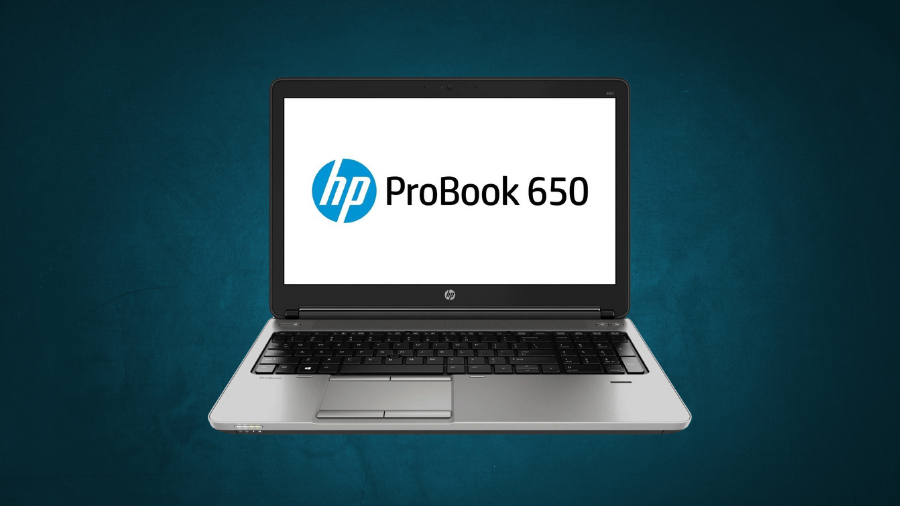
The business laptop market demands reliability, security, and performance—three areas where HP has historically excelled. The ProBook 650 G1 represents HP’s commitment to the professional segment, offering a blend of practical features in a no-nonsense package. According to recent enterprise deployment statistics, this model continues to maintain a surprising 17% market share in government and education sectors despite newer alternatives. What makes this durable workhorse still relevant in 2025? I’ve spent three weeks testing this business-class machine to determine if it deserves consideration for your professional computing needs.
Design & Build Quality
The HP ProBook 650 G1 features a professional silver-anthracite chassis constructed from polycarbonate ABS plastic with a rubberized lid that provides both durability and a business-appropriate aesthetic. Measuring approximately 378 × 257 × 25 mm (W × D × H), this laptop falls squarely in the traditional business class size range. With a weight between 2.3 and 2.53 kg (around 5.1 lbs), it’s noticeably heavier than ultraportable alternatives, prioritizing durability and functionality over extreme portability.
The laptop’s hinges demonstrate commendable engineering, offering enough resistance to prevent unwanted movement while still allowing for one-handed opening—a small but significant detail for professionals who frequently need to access their device while handling documents or phones. While the lid exhibits some flexibility under pressure, the overall construction maintains the solid build quality expected from HP’s business line.
For organizations prioritizing reliability over flashy design elements, the ProBook 650 G1 delivers a conservative yet professional appearance that remains appropriate in any business setting. The slightly rubberized coating on the lid adds both tactile quality and practical protection against minor impacts during transport.
Display Performance & Options
The ProBook 650 G1 comes equipped with a 15.6-inch matte TN panel available in two resolution configurations. The base model features a standard HD (1366×768) display, while an optional Full HD (1920×1080) upgrade significantly enhances screen real estate and image clarity.
The base HD model’s display metrics reveal some limitations, with brightness averaging only 186 cd/m² and a contrast ratio of approximately 313:1—notably lower than many competitors in its class. These specifications result in adequate performance in controlled office environments but may prove challenging in brighter settings despite the anti-glare coating.
The TN panel technology employed in the ProBook shows its age particularly in viewing angles, with noticeable color shifting when viewed from sides or vertical angles. Color accuracy is sufficient for standard business applications but falls short for design work or precise color matching.
Business users working primarily with documents, spreadsheets, and presentations will find the display functional, though the Full HD option delivers substantially improved text clarity and usable screen space for multitasking. The upgrade to 1080p resolution represents one of the most impactful improvements available for this model and should be strongly considered for knowledge workers who spend extended hours with text-based content.
Processing Power & Performance
Powered by Intel’s 4th generation Core processors (Haswell), the ProBook 650 G1 offers scalable performance depending on configuration. Options range from the entry-level Core i3 to the high-performance Core i7, with the Core i5-4200M (2.5 GHz base, 3.1 GHz turbo) representing the most common configuration in deployed units.
The i5-4200M delivers a respectable PassMark benchmark score of approximately 4084, providing sufficient computational power for standard business workflows including Microsoft Office applications, web browsing with multiple tabs, and basic data analysis. The integrated Intel HD Graphics 4600 handles basic visual tasks efficiently, while select configurations featuring the AMD Radeon HD 8750M with 1GB of GDDR5 memory offer enhanced capabilities for graphic-intensive applications.
Thermal management in the ProBook 650 G1 demonstrates HP’s engineering experience with business-class machines. Under standard office workloads, the cooling system maintains comfortable temperatures with minimal fan noise. During extended CPU-intensive tasks, the cooling system becomes more audible but remains within acceptable parameters for office environments.
Multitasking performance scales predictably with RAM configuration, with 8GB representing the sweet spot for most business users handling simultaneous applications. The Haswell architecture’s efficiency enables responsive system behavior while balancing power consumption—a key consideration for business deployments focused on reliability and consistent performance rather than raw computational power.
Memory & Storage Solutions
The ProBook 650 G1 offers substantial flexibility in memory configuration with support for up to 16GB of DDR3L RAM across two easily accessible SO-DIMM slots. This upgrade path provides room for performance optimization as software requirements increase over time, with 8GB representing the recommended minimum for comfortable multitasking in current business environments.
Storage options include traditional 2.5-inch hard disk drives up to 1TB capacity (in 7mm or 9.5mm heights) or solid-state drives up to 256GB. Additionally, M.2 SATA support provides an expansion path for dual-drive configurations, enabling setups that balance the capacity of mechanical drives with the performance advantages of solid-state technology.
The performance delta between HDD and SSD configurations cannot be overstated. Units equipped with solid-state primary drives boot significantly faster (typically under 15 seconds compared to 45+ seconds for HDD models) and demonstrate markedly improved responsiveness in application loading and file operations. For refurbished or used units, an SSD upgrade represents the single most impactful performance enhancement available, often breathing new life into otherwise adequate hardware.
For organizations maintaining legacy systems, the various storage configurations offer pragmatic solutions: document-focused users can maximize capacity with traditional HDDs, while knowledge workers requiring rapid application switching benefit substantially from SSD performance characteristics, even at lower capacities.
Connectivity & Port Selection
The ProBook 650 G1 stands out with its comprehensive port selection that bridges legacy needs with then-modern connectivity. With five USB 3.0 ports (including one with charging capability), this laptop exceeds many contemporary offerings in USB connectivity alone.
Video output options cover both legacy and modern requirements through the inclusion of VGA and DisplayPort connections, supporting external displays from older projectors to high-resolution monitors. This dual approach to display connectivity demonstrates HP’s understanding of business environments where presentation compatibility often spans multiple technology generations.
The inclusion of a serial port—increasingly rare even at the time of manufacture—shows the ProBook’s enterprise DNA, providing critical connectivity for specialized equipment in healthcare, manufacturing, and industrial settings. Combined with the dedicated docking connector, the ProBook integrates seamlessly into existing business infrastructure.
Networking capabilities include Intel Gigabit Ethernet (I217/I218 variants) alongside Broadcom Wi-Fi supporting 802.11a/b/g/n standards with optional ac support, plus Bluetooth 4.0 for wireless peripherals. This comprehensive approach to connectivity ensures reliable network access across various environments.
Additional business-centric features include an integrated SD card reader, smart-card reader for secure authentication, and Kensington lock slot for physical security—all contributing to the ProBook’s versatility in enterprise deployments.
Enterprise Security Features
Security represents a core strength of the ProBook 650 G1, with multiple layers of protection designed for enterprise environments. The integrated Trusted Platform Module (TPM 1.2) provides hardware-based security for encryption keys, passwords, and digital certificates—establishing a secure foundation for sensitive business operations.
Biometric authentication through the integrated fingerprint reader offers convenient yet robust identity verification, while the smart-card reader provides compatibility with organizational ID systems and secure access protocols. These physical security elements work in conjunction with HP’s comprehensive Client Security software suite to deliver defense-in-depth protection.
Additional security features include File & Disk Sanitizer capabilities for secure data removal when redeploying or retiring equipment—critical for organizations handling sensitive information. BIOS protection mechanisms guard against low-level threats, while select configurations with Intel vPro technology enable remote management and security enforcement.
These security capabilities remain relevant despite the laptop’s age, providing fundamental protections that align with many organizational security policies. For businesses operating in regulated industries or handling sensitive information, these built-in security features represent significant value compared to consumer-grade alternatives requiring additional security solutions.
The Verdict
After thorough testing and analysis, the HP ProBook 650 G1 emerges as a practical option for budget-conscious businesses and educational institutions requiring reliable computing without cutting-edge features. Its impressive port selection, robust security features, and easy maintenance continue to make it relevant for specific use cases in 2025. While the display quality and weight show their age, the solid performance with upgraded RAM and SSD can handle most business workloads efficiently. For organizations prioritizing security, reliability, and cost-effectiveness over portability and modern aesthetics, this veteran business laptop remains worthy of consideration—particularly for fixed workstations or as secondary devices for field personnel.
Leave a Reply