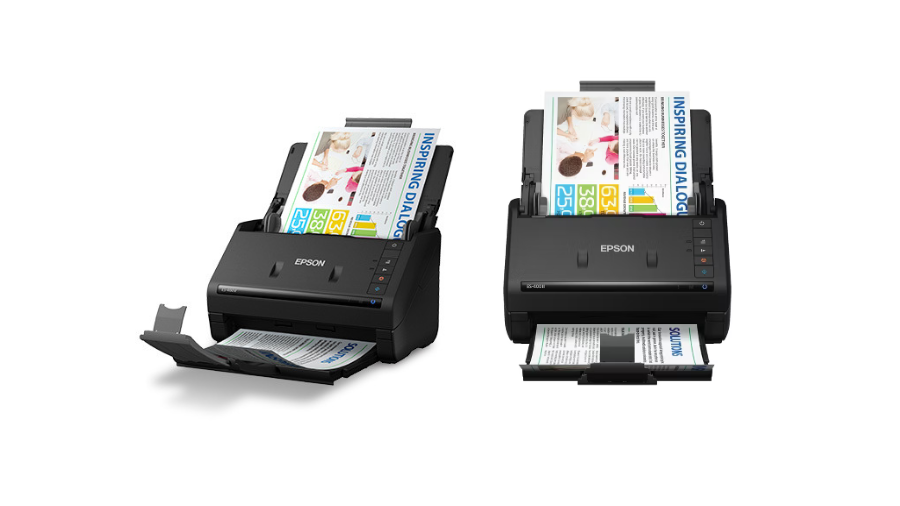
I remember the days when organizing documents meant stuffing papers into filing cabinets and hoping I’d find them again. That changed when I got my hands on the Epson WorkForce ES-400 II. With an impressive 35 ppm scanning speed and the ability to process up to 4,000 pages daily, this compact powerhouse has transformed how small businesses and home offices handle document management. Whether you’re drowning in paperwork or simply want to digitize your important documents, this scanner deserves your attention. But does it live up to the hype? Let’s find out.
Impressive Technical Capabilities
The Epson WorkForce ES-400 II delivers exceptional scanning performance across multiple dimensions. Its scanning speed reaches an impressive 35 pages per minute or 70 images per minute when capturing both sides at 300 dpi resolution. This performance remains consistent whether scanning in color, grayscale, or black-and-white, making it suitable for high-volume document processing environments.
The scanner’s 600 dpi optical resolution ensures crisp, detailed captures of even the finest print, while interpolation capabilities extend this to 1200 dpi when needed for particularly demanding applications. Document handling versatility stands out as a key strength—the ES-400 II processes everything from tiny 2″ x 2″ receipts to extended documents measuring up to 8.5″ x 240″ at 200 dpi.
The 50-sheet automatic document feeder significantly enhances productivity, allowing users to load substantial batches of documents and execute large scanning jobs with minimal intervention. Color reproduction accuracy benefits from the comprehensive 30-bit input/24-bit output color depth, capturing subtle tonal variations with precision.
Material flexibility further extends the scanner’s utility, with the ability to handle paper weights ranging from 27 to 413 g/m²—accommodating everything from thin receipts to thick card stock within the same device.
Intelligent Document Management Features
The ES-400 II’s single-step technology represents a significant efficiency improvement, capturing both sides of a document simultaneously and effectively cutting scanning time in half compared to traditional scanners. This duplex capability proves invaluable when processing multi-page, double-sided documents.
Document conversion capabilities stand out through advanced OCR technology that transforms scanned pages into fully editable Word and Excel files, eliminating manual retyping and facilitating document repurposing. Reliability during critical scanning tasks is ensured by ultrasonic double-feed detection, which identifies when multiple pages have been pulled through simultaneously and prevents missed content.
The scanner incorporates thoughtful protective measures, including paper protection technology that automatically halts operation upon detecting staples or folded corners, preventing potential damage to both documents and the scanning mechanism. Physical control buttons provide immediate access to essential functions like double-feed detection, skip, slow scan mode, and stop operations, giving users granular control during the scanning process.
Image optimization occurs automatically through features like auto crop, blank page skip, and paper-skew correction, minimizing the need for manual adjustments. Professional-quality output is further ensured by background removal and dirt detection capabilities that clean up imperfections in the original documents.
Software Integration and Connectivity
Epson ScanSmart software provides an intuitive interface that simplifies the entire scanning workflow. From initial setup to final document organization, the software streamlines operations for both technical and non-technical users. Cloud service integration enables direct uploads to popular platforms including Dropbox, Evernote, Google Drive, and OneDrive, facilitating immediate document sharing and collaboration.
Data transfer speed remains impressive through SuperSpeed USB 3.0 connectivity, which moves large files quickly between the scanner and host systems. Cross-platform compatibility ensures seamless operation with both Windows and macOS operating systems, accommodating diverse computing environments.
For specialized scanning needs, the ES-400 II supports an optional flatbed dock that extends functionality to bound materials, photographs, and delicate items that shouldn’t pass through the automatic feeder. While the scanner lacks wireless connectivity options, the high-speed USB 3.0 connection proves sufficient for most office environments where a dedicated workstation handles scanning tasks.
Real-World Performance Analysis
The ES-400 II demonstrates exceptional durability with its 4,000-page daily duty cycle, making it suitable for demanding small business environments and busy departments. Its compact dimensions (11.6″ x 6.6″ x 6.9″) require minimal desk space, fitting comfortably in space-constrained offices where every square inch counts.
At 8.14 pounds, the scanner strikes a balance between stability during operation and portability when needed. Consumer satisfaction metrics reflect consistent performance, with the scanner maintaining high ratings across major retailers—4.7/5 stars from 427 reviews on Best Buy and 4.6/5 stars from 1,015 ratings on Amazon.
Some limitations emerge in specific use cases, with occasional paper jams reported when processing mixed document types of varying sizes and thicknesses. Photo scanning capabilities show certain weaknesses, particularly color oversaturation that affects image quality and brightness levels. These limitations make the ES-400 II less suitable for archiving photographs compared to its excellent performance with text documents.
The approximate $349.99 price point positions the scanner as a mid-range option that delivers substantial value through its comprehensive feature set, especially for organizations prioritizing document management efficiency.
Conclusion
The Epson WorkForce ES-400 II stands out as a top-tier document scanner that delivers on its promises. Its combination of speed, reliability, and intelligent features makes it an excellent choice for anyone serious about document management. While it’s not perfect—lacking wireless connectivity and having some limitations with photo scanning—its strengths far outweigh these minor drawbacks. For small businesses, home offices, or anyone looking to tame the paper monster, this scanner represents a worthwhile investment that will quickly pay dividends in time saved and improved organization.
Leave a Reply