The average office worker spends over 1,700 hours a year sitting at their desk. With numbers like that, your chair isn’t just furniture—it’s a crucial part of your workflow.
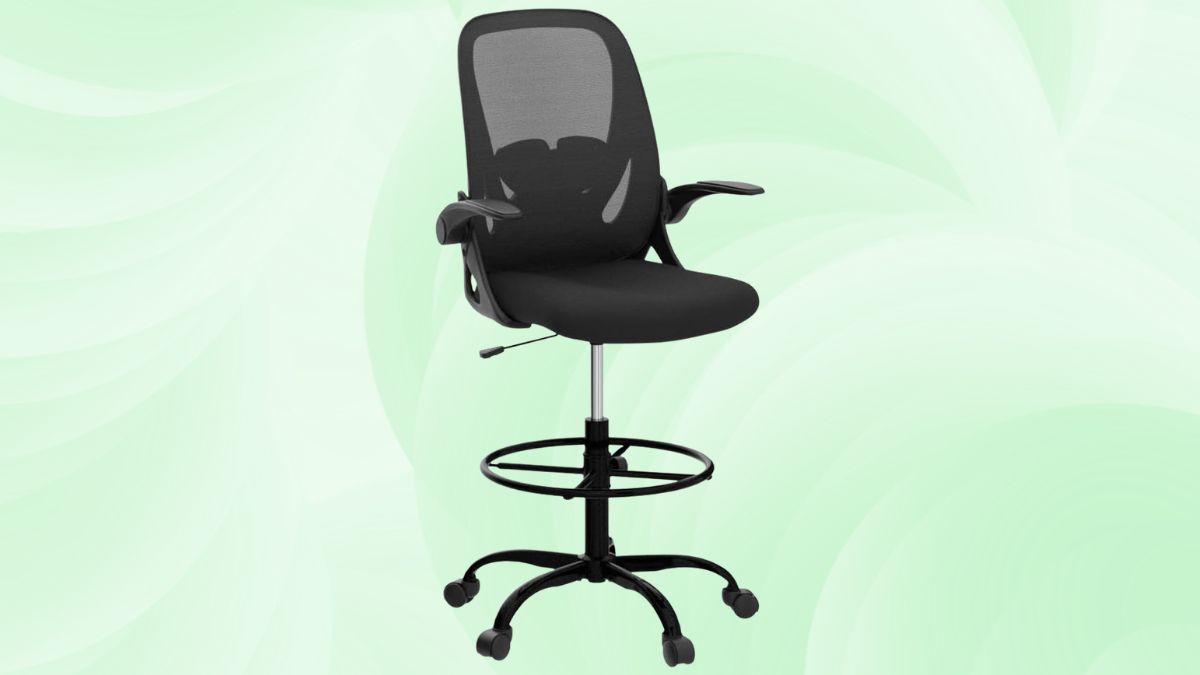
The Primy Drafting Chair stands tall (literally and figuratively) as a solution for those working at elevated desks, offering comfort, stability, and flexibility where it counts.
Whether you’re an architect hunched over blueprints or a modern professional navigating a sit-stand workstation, this chair meets the unique demands of tall seating with ergonomic clarity.
Elevate Your Workspace with the Primy Drafting Chair
Designed with standing desk users and creative professionals in mind, the Primy Drafting Chair—specifically models PR934-Z and 934W-Z—fills the gap between standard office seating and more industrial drafting stools.
Its flexible design accommodates a variety of work environments, from corporate offices to creative studios and lab settings.
Key Features That Set the Primy Drafting Chair Apart
To appreciate what makes this chair stand out, it’s helpful to break down its defining features.
Innovative Armrest Design
- Flip-up armrests rotate 90° to let you slide the chair under your desk.
- Makes standing desk transitions smoother without getting caught on the arms.
Exceptional Height Adjustability
- Adjusts from 19.7 to 27.7 inches, ideal for standard desks and tall workstations.
- Reduces the need to alternate between different chairs throughout the day.
Customizable Lumbar Support
- 2-inch vertical range for butterfly-style lumbar pad.
- Supports various back profiles and encourages healthy posture.
Built for Comfort and Durability
Beyond ergonomics, the Primy Chair is built to last—without compromising on comfort.
Quality Materials and Construction
- FSC-certified wood frame ensures durability and eco-conscious design.
- Iron base adds strength without unnecessary bulk.
- 3-inch high-density foam balances softness with structured support.
Impressive Weight Capacity
- Rated up to 300 lbs—surpassing most chairs in its category.
- Accommodates a broader range of users while maintaining stability.
Breathable Design Elements
- Mesh backrest keeps you cool during long seated sessions.
- Ideal for intensive workdays that demand extended focus.
Practical Applications for Different Work Environments
Whether you’re managing data in a lab or sketching designs at a drafting table, the Primy adapts to your workflow.
Standing Desk Integration
- Height range syncs perfectly with sit-stand desks.
- 360° swivel and smooth-rolling PU casters enhance mobility.
Creative and Technical Studios
- Footrest ring (adjustable to 9.3 inches) supports legs during long design sessions.
- Keeps fatigue at bay during high-focus tasks.
Laboratory Settings
- Easy-to-clean materials suit clinical or sterile spaces.
- Flip-up arms prevent interference when navigating around lab benches or tools.
Comparing Models: PR934-Z vs. 934W-Z
Although functionally the same, these two models offer visual variation to match different interior styles.
Material and Construction Similarities
- Identical specs: height, lumbar, base, mesh back, and cushioning.
- Built with the same environmentally conscious and ergonomic components.
Design Variations
- Cosmetic differences only—no trade-off in comfort or performance.
- Lets you match your chair with modern or traditional aesthetics.
Complementary Workspace Aesthetics
- Neutral color options blend seamlessly with most décor.
- Design prioritizes practicality while remaining visually understated.
Potential Limitations to Consider
While the Primy excels in key areas, it does have a few limitations worth noting.
Cushion Performance Over Time
- The foam may compress slightly for users near the 300-lb mark.
- Comfort remains solid, but expect minor wear after long-term use.
Footrest Stability Considerations
- Foot ring may need occasional tightening with heavy or repetitive use.
- Not a dealbreaker, but worth monitoring if you’re adjusting height frequently.
Advanced Feature Limitations
- No tilt tension adjustment or seat depth tuning.
- Lacks some of the bells and whistles of high-end ergonomic chairs, but trades them for affordability.
Making the Most of Your Primy Drafting Chair
For the best ergonomic benefits, a few configuration tips can make all the difference.
Optimal Height Configuration
- Set seat height so your elbows form a 90° angle at your desk.
- Adjust proportionally as you raise or lower your workstation.
Footrest Ring Positioning
- Position 6–8 inches below your thighs to prevent knee pressure.
- Promotes proper circulation when seated high.
Lumbar Support Adjustment
- Align lumbar pad to the curve of your lower back.
- A good benchmark is just above the belt line for most users.
A Strong Choice for Elevated Workspaces
The Primy Drafting Chair offers a rare blend of ergonomic design, functional adjustability, and accessible price—all suited for professionals using standing desks, creative tables, or lab benches. While it doesn’t chase luxury features, it focuses on core needs: proper height range, comfort, and practical adjustability.
If you’re looking for a tall office chair that does the job well—and looks good doing it—this may be your most balanced option yet.
Available on Amazon as part of the New Releases in the Office Furniture category, the Primy Drafting Chair gives you flexibility, comfort, and thoughtful design—all in a form that adapts to your evolving workday.
Ready to browse more new ergonomic solutions? Explore other releases in the Office Furniture category to upgrade your workspace even further.
Leave a Reply