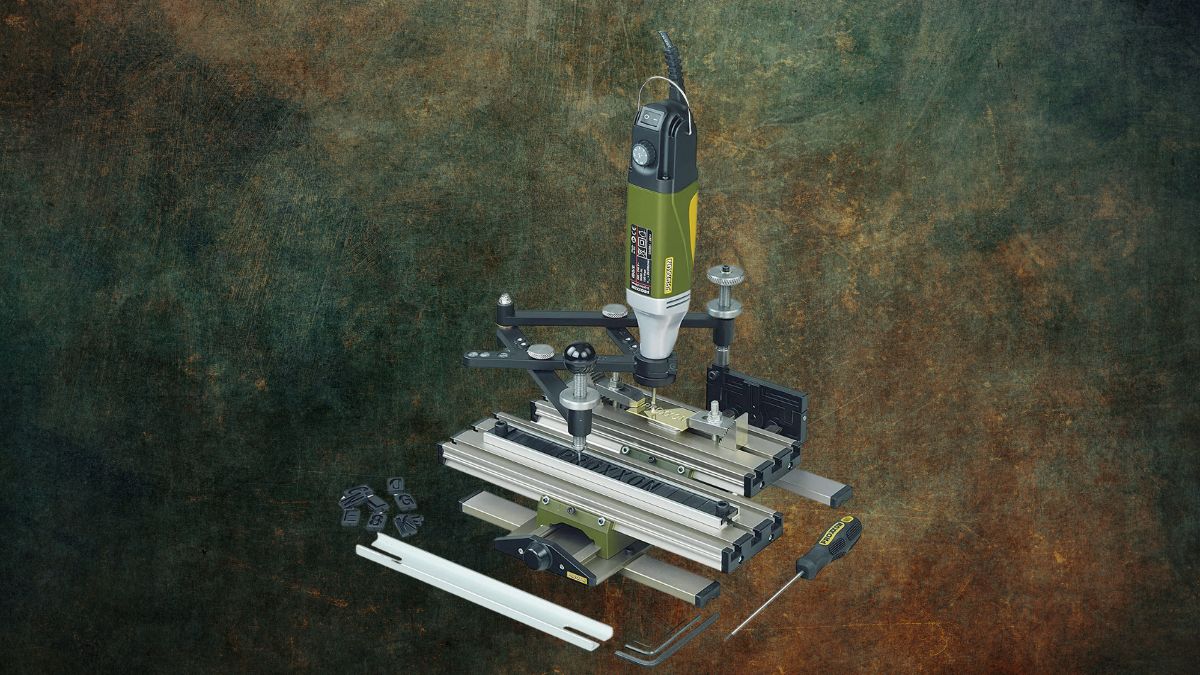
For anyone working in fine-detail crafts—jewelry, signage, personalization, or modeling—precision matters. So does repeatability.
The PROXXON Engraving Device GE 20 27106 doesn’t just let you engrave materials; it gives you scalable control over letterforms, symbols, and custom shapes across a wide variety of surfaces. But how exactly does it do that?
In this guide, we break down the GE 20’s core mechanics, setup steps, compatible tools, engraving techniques, and long-term value.
Whether you’re a hobbyist or a small business operator, this system offers repeatable accuracy without digital complexity.
How the Pantograph System Enables Scalable Engraving
At the heart of the PROXXON GE 20 is a mechanical pantograph. This design replicates your tracing movements at a reduced scale, with selectable reduction ratios (2:1, 3:1, 4:1, 5:1). That means:
- You can trace a character or shape once, and the GE 20 will automatically produce a smaller version.
- You maintain full manual control over pressure, angle, and speed—ideal for materials with different surface resistance.
This reduction system is especially helpful when you want consistent output across different project sizes or when switching between bold signage and fine jewelry inscriptions.
How to Set Up the GE 20 for Best Results
A precision tool like this depends heavily on initial setup. Here’s a step-by-step overview of how to get started:
1. Mounting the Device
- Secure the GE 20 to a flat, stable workbench using the included mounting hardware.
- Stability is essential to prevent slippage during engraving, especially on glass or stoneware.
2. Installing a Rotary Tool
- The GE 20 is designed for PROXXON MICROMOT tools with a 20mm collar.
- The IBS/E (Model 38481) is recommended for optimal torque and speed control.
3. Selecting and Installing a Stylus
- 0.5mm stylus for intricate details (e.g., jewelry).
- 1.0mm stylus for deeper, bolder lines (e.g., signage or stoneware).
- Install the stylus into your rotary tool and test-fit before proceeding.
4. Loading Character Templates
- Use the built-in template tray, which holds up to 14 characters.
- Each character set is pre-sized to work with the pantograph’s scaling system.
5. Calibrating the Ratio
- Choose the reduction ratio according to project size:
- 2:1 for larger, visible designs.
- 5:1 for micro-detailing or tiny inscriptions.
- 2:1 for larger, visible designs.
Before beginning actual projects, run tests on scrap material to fine-tune your pressure and alignment.
How It Handles Different Materials
What sets the GE 20 apart is its cross-material consistency. Here’s how it adapts to different substrates:
- Metals (brass, copper, aluminum): Ideal for plaques, tags, and jewelry. Use the 1.0mm stylus and moderate pressure.
- Plastics (acrylic, ABS): Produces clean lines without melting. Static removal before engraving helps prevent defects.
- Glass: Requires a gentle touch and extremely stable setup. The reduction system allows for intricate detail.
- Stoneware: Needs high stylus pressure and a slower engraving speed. Great for custom tiles or pottery.
- Wood: Accepts soft stylus settings for marking or light carving.
The GE 20’s consistent character scaling means you can switch between materials without redesigning your layout every time.
How to Expand Its Capabilities with Accessories
The GE 20 is a system, not just a single-purpose tool. Its full potential is unlocked through compatible accessories:
- PROXXON IBS/E Rotary Tool (38481): Core motor unit; required for operation.
- Stylus Sets (0.5mm and 1.0mm): Swap depending on material and detail level.
- Clamping Jaw Set (24 256): Holds irregular items like rings or glassware securely in place.
- Additional Stencil Sets (27104): Offers extra characters and numbers beyond the included sets.
- Lighting and Magnification Aids: Helpful for precise tracing on complex surfaces.
These optional add-ons let you customize your engraving workflow, whether you’re scaling up for production or focusing on single-item artistry.
How to Practice and Improve Your Engraving Technique
Getting pro-level results takes some practice, especially with a fully manual system like the GE 20. Here’s how to get there:
- Start simple. Use soft plastics for initial practice runs.
- Use guide marks. Masking tape or stencils help align templates and stabilize your tracing.
- Consistent pressure is key. Uneven pressure leads to shallow or jagged lines.
- Clean your materials. Dust, oil, or residue will affect stylus behavior.
- Color-filling or polishing. After engraving, use paint fills or buffing for better visibility and finish.
Developing a few repeatable techniques, like how to hold and trace certain curves, dramatically improves results.
How the GE 20 Performs in Real-World Use
User feedback shows consistent satisfaction, especially after mastering setup and stylus control. Professionals in jewelry and signage love the system’s control over font consistency and scaling.
- Hobbyists: Appreciate the affordability versus CNC alternatives.
- Professionals: Value the ability to do small-batch runs in-house.
- Long-term owners: Report very low maintenance needs beyond occasional lubrication and alignment checks.
Users typically mention a short learning curve, but rapid improvement with just a few test projects.
How the GE 20 Delivers Long-Term Value
At around $244.12 on Amazon, the PROXXON GE 20 isn’t cheap—but it’s priced well for what it offers.
- For professionals: You’ll recoup the cost quickly by avoiding outsourcing.
- For hobbyists: It offers the satisfaction of high-end personalization at home.
- In terms of lifespan: With basic care, users report years of reliable use.
Just remember that full functionality requires about 30–40% extra investment for accessories like the IBS/E rotary tool and stylus heads.
How It Opens Creative Possibilities
With precision and repeatability baked in, the GE 20 enables a wide range of applications:
- Jewelry engraving: Names, symbols, and special dates.
- Nameplates and signs: Clean, uniform letterforms on metal or plastic.
- Keepsakes and gifts: Glassware, tools, or wooden boxes with messages.
- Workshop labeling: Serial numbers or tool IDs for inventory.
- Small business branding: Apply consistent logos or text to handcrafted goods.
These projects all benefit from the same advantage: professional-level detail at a manageable DIY scale.
The PROXXON GE 20 Turns Your Steady Hand into Repeatable Precision
The PROXXON Engraving Device GE 20 27106 transforms detailed hand movements into consistent, scalable engravings. With practice, it becomes a go-to tool for anyone wanting manual control without sacrificing accuracy.
For craftsmen and creatives looking to personalize metal, plastic, glass, and more, this pantograph system remains one of the most accessible and reliable engraving solutions on the market.
Available now on Amazon, the GE 20 is a smart investment for long-term creators who value precision—and want to bring their ideas to life one careful trace at a time.
Leave a Reply