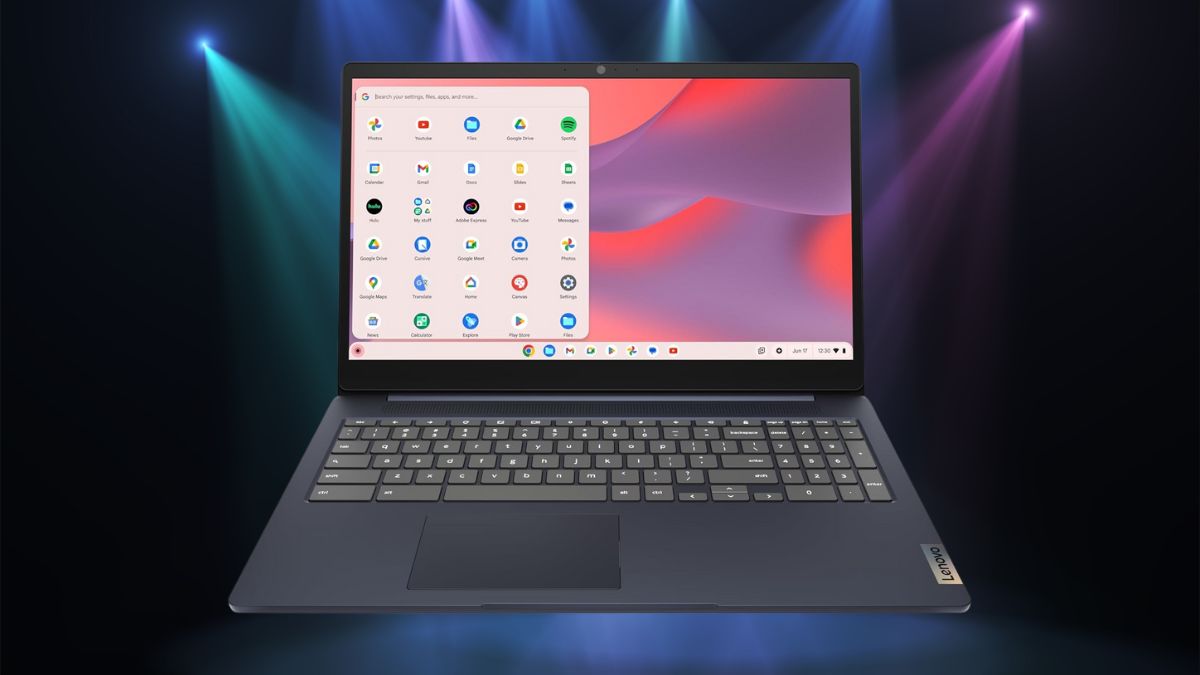
If you’re in the market for a reliable laptop that doesn’t cost a fortune, the Lenovo IdeaPad 3i Chromebook 82N4003CUS might just hit the mark.
With nearly 800 reviews and an average rating of 4.3 stars, it’s clear this Chromebook has found its audience—and after getting hands-on with it, I can see why.
Lenovo manages to pack a surprising number of useful features into this budget-friendly machine, including a large Full HD display and battery life that’ll keep you going all day.
A design that stands out without shouting
First off, this Chromebook looks good. Its Abyss Blue finish gives it a stylish edge over the sea of black and gray laptops out there. It’s subtle but makes a difference, especially if you’re someone who values aesthetics as much as function.
At 14.25 x 9.57 x 0.75 inches and weighing just about 3.59 pounds, the IdeaPad 3i strikes a nice balance between screen size and portability. It’s light enough to toss in a backpack but solid enough that it doesn’t feel flimsy on a desk or your lap.
Build-wise, Lenovo didn’t cut corners. The chassis feels more durable than you’d expect at this price, and the keyboard layout is spacious and comfortable—great for those long typing sessions.
Ports include:
- 2 USB 3.2 Gen 1 Type-A ports
- 1 USB 3.2 Gen 1 Type-C port
- 1 HDMI 1.4 port
- 1 headphone/microphone combo jack
You won’t find yourself reaching for a dongle every five minutes. That alone is a win.
Screen and sound: Better than you’d expect
Let’s talk display. The 15.6-inch Full HD (1920 x 1080) screen is impressively sharp and colorful for a Chromebook in this price range.
Whether you’re streaming shows or editing documents, the visuals are bright and clear. The anti-glare coating also helps if you’re working near windows or under harsh lighting.
The stereo speakers do a decent job too. They won’t blow you away, but they’re clear and get the job done for Zoom calls or Netflix marathons. The 720p HD webcam is well-positioned and delivers crisp enough video for your average meeting or online class.
Everyday performance without the drama
The IdeaPad 3i runs on an Intel Celeron N4500 processor, which, while not a powerhouse on paper, pairs really well with Chrome OS.
That lightweight operating system doesn’t need much to feel snappy, and with 8GB of RAM, multitasking is smoother than you’d expect. You can juggle several tabs, stream music, and edit documents without much lag.
It’s not built for heavy-duty tasks like video editing or gaming, but for school, work, and everyday browsing? It does the job without complaints.
The 64GB of eMMC storage is modest, but Chrome OS leans heavily on cloud storage anyway. Plus, Google Drive integration and Android apps from the Play Store help stretch the device’s capabilities well beyond the browser.
Battery life that keeps up
One of the biggest selling points here is battery life. Lenovo claims up to 10 hours, and in real-world use, it’s not far off. Whether you’re working through a full school day or powering through meetings, the IdeaPad 3i won’t have you glued to an outlet.
Charging is quick too—plug in for a bit, and you’re good for hours. Combined with its quiet operation (no loud fans here), this Chromebook is a great travel companion or work-from-anywhere solution.
Chrome OS: Simple, secure, and to the point
If you’re not familiar with Chrome OS, here’s the short version: it’s fast, secure, and easy to use. It boots up in seconds, handles updates in the background, and doesn’t come loaded with the bloatware you often find on other systems.
Security is baked in, with built-in virus protection and automatic software updates that take the guesswork out of staying protected.
And thanks to the Google Play Store, you can access thousands of Android apps, adding flexibility for work and play.
Google Workspace apps like Docs, Sheets, and Slides work seamlessly, and yes—there’s offline support when you need it.
Well-rounded connectivity
Lenovo didn’t skimp on ports or connectivity. Dual-band Wi-Fi ensures strong wireless performance, and Bluetooth makes pairing with headphones or a wireless mouse a breeze. With a mix of USB-A and USB-C, plus HDMI and an audio jack, you’re covered for most day-to-day needs—no extra gear required.
Final thoughts: Is it worth it?
In short? Yes—if you’re looking for a dependable, affordable laptop that handles the basics and then some.
The Lenovo IdeaPad 3i Chromebook 82N4003CUS isn’t trying to be a powerhouse. It’s designed for everyday users—students, remote workers, casual browsers—who want a large, vibrant screen, strong battery life, and smooth performance in a no-fuss package. And it delivers exactly that.
While power users may want to look elsewhere for more muscle, everyone else will likely find this Chromebook a great value for the money.
If your goal is to stretch your dollar without sacrificing functionality, this one’s a smart pick.
Leave a Reply