If you work with big files, you know how fast space runs out. I ran into this exact problem while managing 4K video projects in my editing studio. That’s when I turned to the Seagate 22TB External Hard Drive—and honestly, it changed everything.
This drive offers massive room for files, runs smoothly, and helps you stay organized. With over 258,000 reviews and a strong 4.6-star rating, it’s clear I’m not the only fan. From creative work to complete system backups, this thing is built for serious users.
Let’s look at what it does and how it performs in real-life use.
The Seagate 22TB External Hard Drive Handles All Your Storage Needs
Think about how much you can store with 22TB. That’s more than 5,000 hours of HD video. Or millions of high-res photos. For gamers, it’s hundreds of AAA titles. This is not just storage—it’s your new digital vault.
If you deal with 4K footage, raw image files, or audio projects, this high-capacity storage drive can handle it. One video project alone can take up 30GB, and this drive holds hundreds of those without blinking.
You can also use it as a complete backup hub. Most computers have 1TB or 2TB drives, so this can store full system backups for 10 or more machines in one place. No juggling multiple drives or sorting out file versions.
Compact But Powerful: Desktop-Grade Storage in One Box
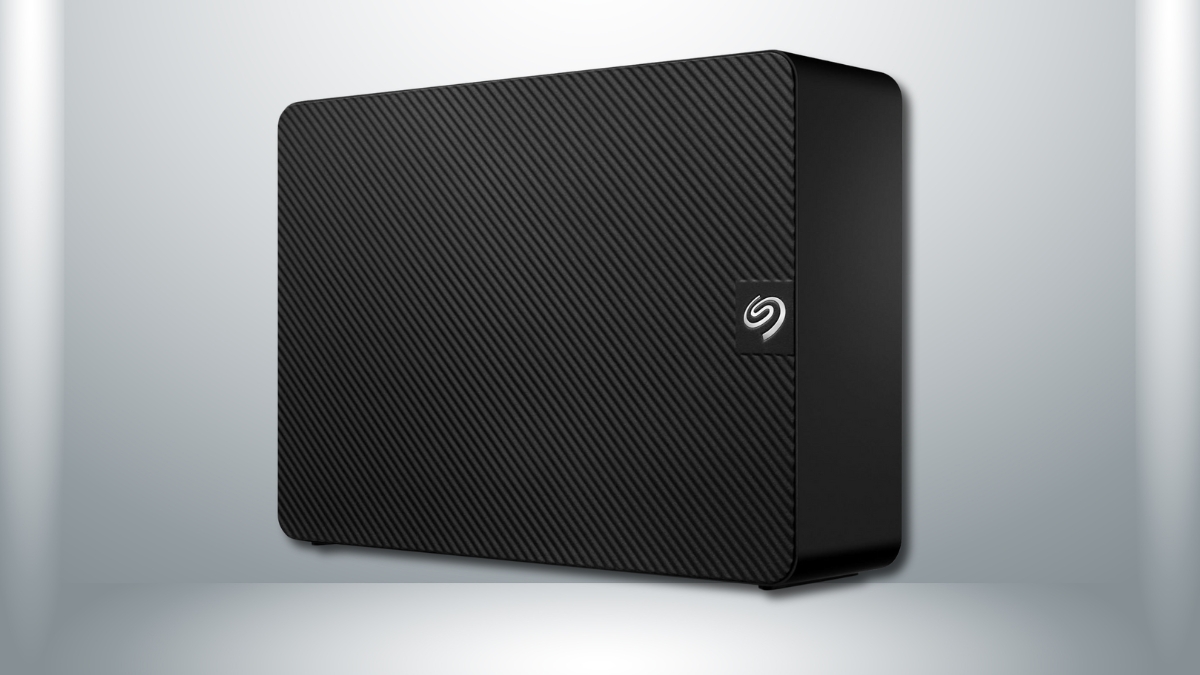
This is a desktop external hard drive, not a portable one. It’s built to sit on your desk and stay there. It measures 7 x 5 x 1.65 inches and weighs around 2.6 lbs. It’s solid, stable, and made for everyday use.
It uses USB 3.0, giving you quick transfers up to 5Gbps. You can plug it into older ports too—it works with USB 2.0, just at slower speeds.
One important note: this drive needs power from the wall. It comes with an 18W power adapter. That makes it less portable, but more powerful and reliable for daily tasks.
The design is clean and simple. The textured black casing looks sharp and blends in easily. There’s a small LED light to show it’s running, but it’s not distracting.
Transfer Speeds and Real-World Performance
Let’s talk about numbers. When moving large video files, this USB 3.0 external drive hits around 160 to 180MB/s on reads, and about 150 to 170MB/s on writes. That’s strong for a traditional HDD.
When moving tons of small files—like documents or photos—speed drops to around 80 to 100MB/s. That’s expected, and still solid.
Plug it in, and your system recognizes it within seconds. Windows and macOS both detect it quickly. Just keep in mind you’ll need to reformat for full macOS compatibility.
Even during long transfers, the drive stays cool. It warms up a little, but never too hot. The built-in ventilation does the job.
And the noise? At idle, it’s barely noticeable. Even during big transfers, it stays quiet—around 30 decibels. That’s about as loud as a whisper.
Works with Windows and Mac with a Few Tweaks
Out of the box, the drive is set up for Windows in NTFS format. Just plug it in, and you’re good to go.
Mac users will need to reformat it using Disk Utility. Choose exFAT if you want to use it on both Mac and Windows. That takes just a few minutes.
The drive doesn’t come with bloatware, which is great. You can download Seagate DiscWizard for backup tools and SeaTools for health checks if you want extras.
Running both Mac and PC? exFAT formatting works well for that setup, although you’ll lose features like Time Machine.
Seagate Data Recovery Service: Peace of Mind Built In
Here’s a big plus—this drive includes access to Seagate data recovery service. If something goes wrong, Seagate will try to recover your files. That kind of service usually costs hundreds (or more) if you need it on your own.
If the drive fails, Seagate handles the process. They’ll try to recover your data and send it back on a replacement drive if successful. This is a big value add, especially for people storing important work.
For added safety, use the drive in a 3-2-1 backup setup. That means three copies of your data, two different types of storage, and one offsite. This drive makes that strategy easy thanks to its size.
Compared to cloud services, this wins on price. Services like Google Drive or iCloud charge $10 to $20 a month for 2TB. This gives you 11 times the space with one up-front cost.
Tips to Keep It Running Longer
Want this external hard drive for desktop to last? Keep it in a cool, dry place. Let it breathe—don’t cover the vents. Don’t unplug it while it’s working. And check its health with SeaTools now and then.
Based on usage reports, most people see 2 to 4 years of solid performance. Some drives go longer, especially with light to moderate use.
How the Price Compares
At $289.99, this 22TB external HDD offers a strong deal. That’s about $13 per terabyte. Smaller drives often cost more per TB, and you get less convenience. One drive is easier than managing five.
Electricity cost is low too. Using it eight hours a day adds about $5 per year to your energy bill.
If you’re thinking about a NAS system, those cost more and need extra setup. For personal use or solo creators, this external drive keeps things simple.
What People Are Saying
The numbers speak for themselves. With over 258,000 ratings and an average of 4.6 stars, it’s one of the highest-rated high-capacity drives online.
Users love the speed, space, and setup. Video editors, photographers, and even remote workers say it gives them peace of mind.
Common issues? The power cable is short (only about 18 inches), so you might want to grab a longer one. And it’s not made to move around. This is best for a permanent setup.
Most long-term users report good reliability. Failures happen with any drive, but this one stays within normal limits based on feedback.
Worth the Space on Your Desk
The Seagate 22TB External Hard Drive delivers where it counts—massive space, solid speed, and smart features like recovery support. At $289.99, it’s a smart deal for anyone who handles large files, wants fewer devices, and needs long-term peace of mind.
It may not travel well, and it does need a power outlet. But those trade-offs are small compared to the benefits. If you’re tired of running out of space or juggling multiple drives, this storage upgrade is a no-brainer.
You can find it on Amazon and see why so many users trust it as their go-to drive for everything digital.
Leave a Reply